TABLE OF CONTENTS
- Why does my keygroup instrument sound higher than it did in the browser?
- Why don't my pads light up or make any sound when I load a drum kit?
- Key Takeaway
Why does my keygroup instrument sound higher than it did in the browser?
If you've loaded a keygroup instrument and notice that the samples sound higher in pitch than they did when previewing them in the Browser, this is usually related to the selected Pad Bank.
Keygroups are made up of samples mapped across multiple pad banks and octave ranges. These ranges are distributed across Banks A-H.
By default, keygroups loaded from the Browser are assigned to Bank C
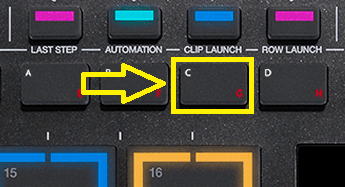
- Bank A plays the lowest octave range.
- Each subsequent bank increases the pitch range.
- Bank H plays the highest octave range.
If your keygroup sounds higher or lower than expected, check which Pad Bank is currently selected. Switching to a different bank will change the octave range being triggered by the pads.
Why don't my pads light up or make any sound when I load a drum kit?
Drum kits loaded from the Browser are assigned to Bank A by default.
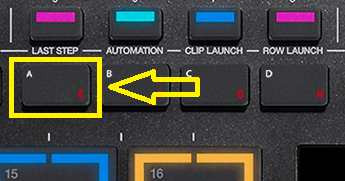
If the pads are not lighting up or producing sound after loading a kit:
- Check which Pad Bank is currently selected.
- Switch back to Bank A and try triggering the pads again.
In many cases, the kit is loaded correctly, but a different Pad Bank is selected, causing the assigned pads to appear inactive.
Key Takeaway
Whenever a keygroup or drum kit does not behave as expected, the first thing to check is the currently selected Pad Bank.
- Keygroup programs loaded from the Browser default to Bank C.
- Drum kits programs loaded from the Browser default to Bank A.
- Selecting the wrong bank can result in unexpected pitches, silent pads, or pads that do not light up.