At Akai Pro, we understand the importance of ensuring our products are fully compatible with the latest operating systems. As such, we are currently conducting systematic tests to ensure that our software is fully compatible with macOS 26 Tahoe.
While the beta builds of Tahoe have been available, we ultimately need to ensure our products are fully compatible with the official release version of macOS 26. This means that we are working diligently to test and optimize our products to ensure a seamless experience for our users.
Currently, Some Akai Pro software and Hardware is not supported on macOS 26 Tahoe - We encourage all our dedicated Akai Pro users to refrain from updating to macOS 26 until compatibility with the new operating system can be confirmed.
macOS 26 Tahoe Hardware Support
All compatibility testing for macOS 26 Tahoe is performed on Intel and base-level Apple Silicon processors. Hardware support confirms testing passed for USB connection, as well as audio and/or MIDI communication.
Any product not listed below is not considered to be supported with macOS 26 Tahoe systems or Apple Silicon Processors.
MPC and Force Hardware
| Product | Intel Processor | Apple Silicon | Minimum Driver Version |
|---|---|---|---|
| Force | Supported | Supported | Class-compliant** |
| MPC Key 61 | Supported* | Supported* | v1.0.2 |
| MPC Live | Not Supported | Not Supported | N/A |
| MPC Live II | Supported* | Supported* | v1.0.4 |
| MPC Live III | Supported | Supported | v1.0.15 |
| MPC One | Supported* | Supported* | v1.0.6 |
| MPC One+ | Supported* | Supported** | v1.0.0 |
| MPC One Gen 2 | Supported | Supported | v1.0.0 |
| MPC Sample | Supported | Supported | Class-compliant |
| MPC Studio 2 | Supported | Supported | N/A |
| MPC Touch | Not Supported | Not Supported | Not Supported |
| MPC X | Supported* | Supported* | v1.0.6 |
| MPC X Special Edition | Supported* | Supported* | v1.0.6 |
| MPC XL | Supported | Supported | v1.0 |
| MPC Key 37 | Supported* | Supported* | v1.0.2 |
| MPC Key 37 Gen 2 | Supported | Supported | v1.0 |
*Requires MPC 2.13 software package or higher accessible from your inMusic profile after registration. Please check the section below for MPC software support status.
Keyboards and MIDI Controllers
| Advance 25 | Supported* | Supported* |
| AFX | Supported | Supported |
| AMX | Supported | Supported |
| APC Key 25 | Supported | Supported |
| APC Key 25 Mk2 | Supported | Supported |
| APC 40 MKII | Supported | Supported |
| APC Mini Mk2 | Supported | Supported |
| APC 64 | Supported | Supported |
| Fire | Supported | Supported |
| LPD8 mk2 | Supported | Supported |
| LPK25 mk2 | Supported | Supported |
| LPK25 Wireless | Supported** | Supported** |
| MIDI Mix | Supported | Supported |
| MPK225 (original and black versions) | Supported | Supported |
| MPK249 (original and black versions) | Supported | Supported (requires firmware update v1.02)*** |
| MPK261 (original and black versions) | Supported | Supported (requires firmware update v1.02)*** |
| MPK Mini MKIII | Supported | Supported |
| MPK Mini MKIV | Supported | Supported |
| MPK Mini Play MKIII | Supported | Supported |
| MPK Mini Plus | Supported | Supported |
| MPD218 | Supported | Supported |
| MPD226 | Class-Compliant Connection Supported | Class-Compliant Connection Supported |
| MPD232 | Class-Compliant Connection Supported | Class-Compliant Connection Supported |
| MPD24 | Supported** | Supported** |
* Requires VIP Advance Driver v1.0.4 or higher. See below for VIP software compatibility.
** Software Editors and other software tools are not currently supported
*** All MPK249 and MPK261 keyboards will require a firmware update to be compatible with Apple Silicon processors. Please refer to our article here for access to the download and update instructions.
EWI
| Product | Intel Processor | Apple Silicon |
|---|---|---|
| EWI5000 | Supported | Supported |
| EWI Solo | Supported | Supported |
| EWI USB | Supported** | Class-Compliant Connection Only** |
** Software Editors and other software tools are not currently supported
Audio Interfaces/Drum Machines/Synthesizers
| Product | Intel Processor | Apple Silicon |
|---|---|---|
| MPX8 | Supported** | Supported** |
** Software Editors and other software tools are not currently supported
macOS 26 Tahoe Software Support
Software
All compatibility testing for macOS 26 Tahoe is performed on Intel and base-level Apple Silicon processors.
Software support confirms testing passed for software installation and key functionality. Software versions confirmed to be supported below are the minimum versions required for full software support on macOS 26 Tahoe and Apple Silicon processors.
Any Akai Pro software not listed below is not considered to be supported with macOS 26 Tahoe systems or Apple Silicon Processors. For MPC Plugin Instrument and Insert Effects support, please visit our article on the AIR Music Tech website.
| Software | Intel Processor | Apple Silicon |
|---|---|---|
| inMusic Software Center | v1.16.1 | v1.16.1 |
| MPC Beats | v2.14 | v2.14 |
| MPC Expansion Builder | v2.12.1 | v2.12.1 |
| MPC 2 Software | v2.13 | v.2.13 |
| MPX8 File Conversion Utility | v1.0.8 | v1.0.8 |
| Network MIDI Driver | v1.4.4 | v1.4.4 |
Software Editors and Utilities
Akai Pro recommends installing any available software preset editors for your products in order to edit functionality that may not be available directly on the product itself. Please refer to the table below for the minimum versions of each software preset editor supported for use on macOS 26 Tahoe and Apple Silicon processors.
If you do not see your product's software editor listed below, it is not considered supported with macOS 26 Tahoe and Apple Silicon Processors.
| Software | Intel Processor | Apple Silicon |
|---|---|---|
| EWI Solo Editor | v1.24 | v1.24 |
| LPD8 mk2 Editor | v1.0.1 | v1.0.2 |
| LPK25 mk2 Editor | Not Supported | v1.0.3 |
| MPK mini mk3 Editor | v1.0.3 | v1.0.3 |
| MPK mini mkII Editor | Not Supported | Not Supported |
| MPK mini Play mk3 Editor | v1.0.2 | v1.0.2 |
| MPK mini Plus Editor | v1.13 | v1.13 |
| MIDI Mix Editor | v1.0.7 | v1.0.7 |
| MPD218 Editor | v1.0.8 | v1.0.8 |
| MPD226 Editor | v1.0.8 | v1.0.8 |
| MPD232 Editor | v1.0.8 | v1.0.8 |
| Rhythm Wolf Tuning Utility | Not Supported | Not Supported |
Firmware Updaters
The following firmware update software is confirmed compatible with macOS 26 Tahoe. Firmware updates are only necessary for single-use updates to your product. Please refer to any release notes and update instructions included in the download prior to installing the software and updating your device firmware.
If you do not see your product's firmware updater listed below, the updater software is not considered supported with macOS 26 Tahoe and Apple Silicon Processors.
| Software | Intel Processor | Apple Silicon |
|---|---|---|
| Force Firmware Updater | v3.2.6 | v3.2.6 |
| LPD8 mk2 Firmware Updater | v1.0.3 | v1.0.3 |
| MPC Firmware Updater | v2.12.1 | v2.12.1 |
| MPK mini MK3 Firmware Updater | v1.26 | v1.26 |
| MPK Mini Plus Firmware Updater | v1.13 | Not Supported |
| MPK Mini MKIV Firmware Updater | v1.41 | v1.38 |
Software Partners
Many of our products are dependent on software for all functionality and control while the device is connected to a computer. Our products may be considered "supported" for an operating system, but will not be functional until software support is also available. It is crucial that you confirm software compatibility before choosing to update your system.
Please check with the developers for your preferred software titles for the latest in macOS 26 Tahoe compatibility before choosing to update. We've listed a few key titles below for your convenience. Browser-based tutorial software such as Melodics, Skoove, and TakeLessons are not affected.
How do I prevent my system from updating automatically?
Please be sure to check that your operating system is not enabled to update itself automatically. While this can be a useful feature for some, anyone who relies on the stability of their software tools should prefer control over which base operating system is installed on their system.
Automatic updates will not account for software compatibility before updating, which could lead to problems with stability and other functionality if your gear is not ready for the changes in the operating system.
To avoid any delays or downtime, it's best to deliberate when making the decision to update and use the opportunity to check that all your software tools will be compatible before making the jump. To turn off automatic updates for macOS, please do the following:
- Navigate to System Settings > General > Software Update
- Click the Information (i) icon beside Automatic Updates
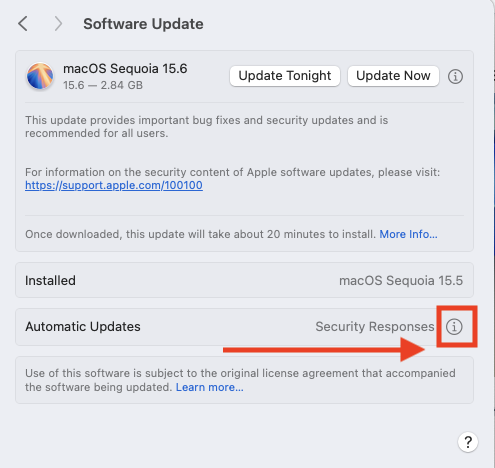
- Uncheck all boxes below:
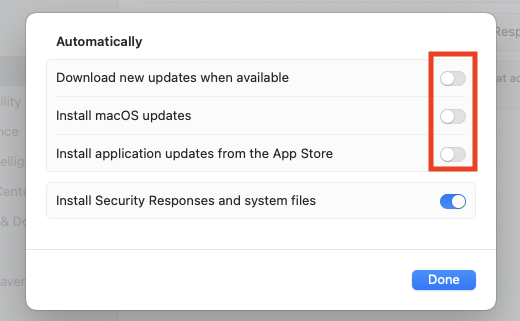
- Click Done to apply the changes
We appreciate your patience and understanding as we work to ensure full compatibility with macOS 26 Tahoe.
If you have any questions or concerns about the compatibility of our products with macOS 26 Tahoe, please do not hesitate to contact our customer support team for assistance. We are here to help and are committed to providing the best possible experience for our customers.