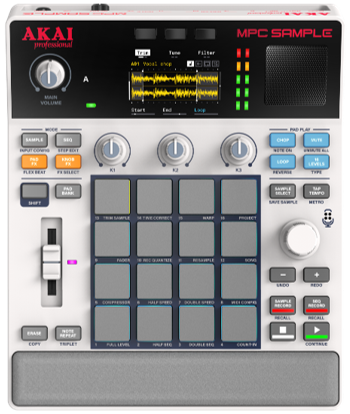
The MPC Sample is a compact and powerful addition to the MPC lineup, designed for musicians, beatmakers, and producers seeking a streamlined creative tool. Focusing on intuitive sampling, seamless sequencing, and expressive effects, it offers an efficient, hands-on workflow ideal for quickly capturing ideas and building beats.
Its user-friendly interface allows beginners to get started easily while offering enough depth for experienced users. With essential features in a portable, easy-to-use design, the MPC Sample brings MPC power to your setup without the complexity of a full DAW.
Additional features include up to 6 hours of battery life, sampling capabilities from 1/4" inputs and USB-C, a built-in microphone, and a built-in speaker.
TABLE OF CONTENTS
- MPC Sample - Frequently Asked Questions:
- Features:
- Is there a Day 1 Firmware Update?
- What are the specifications of the MPC Sample?
- How much storage space is available? What is the size of the internal drive?
- What is the battery life of the MPC Sample?
- What is the battery behaviour when fully charged and still connected to an external DC source?
- How much RAM does it have?
- How many knobs and faders does the unit have, and what are their functions?
- Does it have an SD card slot?
- Does it have a built-in Mic?
- Does it have a built-in Speaker?
- Does it have USB-C?
- Is it possible to transfer content to the MPC Sample from a computer?
- Is it possible to sample audio from my phone or computer?
- How many samples can you have in one project?
- How many sequences can you have in one project?
- How many samples can I have on a Pad?
- Are the chopped samples assigned to individual pads?
- Can the Project be imported to MPC Standalone?
- Is it possible to upload MPC 3 projects to the MPC Sample?
- What is the Project Format?
- Does it have MIDI?
- Will it connect as a controller with the MPC 3 Software?
- Built-in FX:
- Connections:
MPC Sample - Frequently Asked Questions:
Features:
Feature | MPC Sample |
| Size | 9.3x7 6x2 inches |
| RAM | 2GB |
| Storage | 8GB Internal Drive |
| Sounds | 2GB Factory content, over 100 Drum-Kits and Melodic loops |
| Voices | 32 Stereo |
| Built-in Mic | Yes |
| Samples in a single project | Up to 128 |
| Sequences | Up to 128 |
| Battery Life | Up to 6 hours |
| Built-in Speaker | Yes (3-Watts) |
| Built-in Flex Beat Player | Yes |
| Knob FX | Yes |
| PAD FX | Yes |
| Audio Interface | Yes (2 Channel Audio Interface) |
| Sample from your Computer via USB-C | Yes |
Is there a Day 1 firmware update?
Yes, the MPC Sample requires a Day 1 firmware update. Please follow this LINK for a step-by-step guide.
Important Notice for Windows 10 Users: The browser address firmware update is not supported on Windows 10. Please download the MPC Sample Updater for Windows from the MPC Sample Downloads page and follow the instructions provided at the bottom of this page.
What are the specifications of the MPC Sample?
The MPC Sample is equipped with 2GB of RAM and features an additional microSD card slot for expanded user storage of samples and projects. You can also connect it to your computer via USB-C, enabling access as a class-compliant drive.
How much storage space is available? What is the size of the internal drive?
The MPC Sample features an 8GB internal drive preloaded with 2GB of factory content. Storage can be further expanded using the microSD card slot.
What is the battery life of the MPC Sample?
Up to 6 hours.
What is the battery behaviour when fully charged and still connected to an external DC source?
Once the battery reaches full capacity, the device will be powered by the DC source exclusively. The device will continue to draw a trickle of current from the DC adapter in the off position.
How much RAM does it have?
The MPC Sample comes equipped with 2GB of RAM.
How many knobs and faders does the unit have, and what are their functions?
- 1 Main Volume.
- 3 knobs for controlling sample points, envelopes, tuning, bars, quantize, and knob effects.
- 1 Fader to control the pad volume.
- 1 Main Encoder.
Does it have an SD card slot?
Yes, a microSD Card slot.
Does it have a built-in Mic?
Yes it does.
Does it have a built-in Speaker?
Yes, the speaker is automatically disabled when either 1/4" jacks or headphones are connected.
Does it have USB-C?
Yes, the MPC Sample features a USB-C port that charges the battery, allows the device to function as a removable storage drive when connected to a computer, and enables sampling directly from a computer, tablet, or phone.
Is it possible to transfer content to the MPC Sample from a computer?
Yes, by connecting it directly to a computer using the included USB-C cable.
Is it possible to sample audio from my phone or computer?
Yes, this is possible via USB-C.
How many samples can you have in one project?
Each project can contain up to 128 samples.
How many sequences can you have in one project?
A single project can contain up to 128 sequences.
How many samples can I have on a Pad?
Each pad can hold one sample.
Are the chopped samples assigned to individual pads?
While the chopped samples initially appear on a single pad, you have the ability to play them across multiple pads.
Can the Project be imported to MPC Standalone and MPC Desktop?
MPC Sample projects are compatible with MPC hardware/software running version 3.8 and higher, so you can continue production in standalone mode or on MPC 3 desktop software.
Is it possible to upload MPC 3 projects to the MPC Sample?
No, MPC 3 projects should not be exported to your MPC Sample.
What is the Project Format?
Identical to the MPC structure: an MPC project file accompanied by the [ProjectData] folder.
Does it have MIDI?
Yes, you can utilize the 3.5mm TRS ports for both MIDI IN and OUT connections.
Will it connect as a controller with the MPC 3 Software?
It is not compatible for use as a controller with MPC 3 Software.
Built-in FX:
What are KNOB FX?
KNOB FX provides access to 28 different effects, which will let you assign 1 effect to a single pad, selected pads, or all pads. You can use the 3 knobs to adjust effect parameters and record these adjustments into your sequence, enabling automation.
Pressing the KNOB FX button will activate the KNOB FX feature, allowing you to use the 3 knobs to control each parameter of the effect.
By holding Shift and pressing KNOB FX, you can change the KNOB FX settings. In this mode, you can tap the PADS you wish to target, or select the second button at the top to apply the effect to all pads.
What are PAD FX?
PAD FX offers 16 selectable effects that can be applied to the Pads. Up to four effects can be used simultaneously, with their settings adjustable via the corresponding knobs. Press the "Latch" button to keep the effects activated. Similar to the KNOB FX feature, you can also record these adjustments directly into your sequence.
Does it have built-in Flex Beat?
Yes, the MPC Sample includes a built-in Flex Beat feature, offering 16 different Flex Beat effects that you can select by using the pads.
To access Flex Beat, simply hold SHIFT and press PAD FX.
Connections:
How many inputs and outputs does the MPC Sample have?
| Audio Output (1 Stereo Pair) | 2x 1/4 (6.35mm) TRS (Line-Level) |
| Audio Input | 2x 1/4 (6.35mm) TRS (Mic/Line-Level) |
| Headphones | 1x 1/8" 3.5mm TRS |
| MIDI In | 1x 1/8" 3.5mm TRS |
| MIDI Out | 1x 1/8" 3.5mm TRS |
| Sync Out | 1x 1/8" 3.5mm TRS |
| USB-C | 1x USB-C port (used for battery charging and computer connectivity) |
| microSD Card Slot | Yes |
Is the TRS-Din adapter Type-A or Type-B?
The adaptor provided with the MPC Sample is of Type-A configuration.