If your recordings on the MPC Sample don’t sound quite the same as what you originally played, this is often due to the Time Correct feature.
Time Correct is designed to help tighten your performance by automatically aligning your notes to a defined timing grid, keeping everything in time.
This can be very useful for achieving a polished, consistent rhythm, but depending on your settings, it may slightly adjust the feel of your original performance during playback.
Please choose from the options below depending on whether you’d like to fully disable Time Correct or simply adjust its settings:
TABLE OF CONTENTS
To Deactivate Time Correct
Hold the SHIFT button and tap Pad 14.
The screen below will appear:
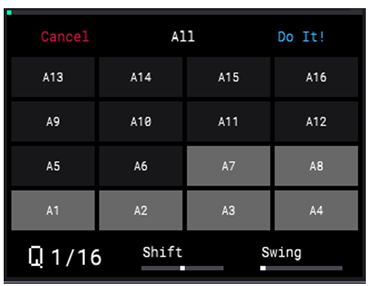
Now, simply strike your chosen pad; its indicator on the display will change from grey to black, signaling that Time Correct has been turned off for that pad.
Adjust Time Correct's Settings
Turn the K1 Knob to adjust the quantization value.
1/4 puts a strong emphasis on each quater note. To better understand this, think about the rhythm of the kick drum in Stayin' Alive by the Bee Gees.
1/8 puts a strong emphasis on eighth notes. This time, think about the speed of the bass line in Billie Jean by Michael Jackson.
The rhythm of the Billie Jean bass line would sound like Another One Bites the Dust by Queen if the time correct feature was applied and set to 1/4.
1/16 will snap your notes to the same speed as the hi-hat groove in Basket Case by Green Day. 1/16 is used almost exclusively for hi-hats only.
1/32 is very fast; you will likely not need to use these divisions unless you want to create an incredibly speedy track.
Any value with T next to it will quantize to tripplets. This should only be activated if you want to pack three notes into the space of two.
Turn the K2 Knob to adjust the Shift value.
This setting adjusts all selected events forward or backward in the sequence by a small amount.
This can allow you to create subtle timing variations that give your events a more “humanized” feel.
Turn the K3 Knob to adjust the Swing value.
This setting lets you “shuffle” your beats by shifting the timing of notes, so they have a triplet-like feel instead of falling on the downbeat.
To apply the Time Correct settings, press the B3 Function Button (Do It!). All recorded events for the selected
pads are adjusted according to the settings.