Users may find their AIR plugin GUI/Controls freeze or become unresponsive while still being audible during playback in Pro Tools.
This was a confirmed issue in earlier versions of Pro Tools that has been resolved in a recent Pro Tools update: Pro Tools 2025.12.1
To resolve this issue, please use Avid Link to ensure you are on the latest version of Pro Tools and update when possible.
Alternatively, you can manually download the latest versions via the Avid Download Center.
If you are unsure of which version you are running, you can see this via Avid Link under the Product tab or via the Help -> About Pro Tools menu.
Workaround
If users cannot update to Pro Tools 2025.12.1, the steps below provide a workaround to regain control of the plugin GUI:
- Right-click the affected plugin on the Mix Window
- Select Make Inactive
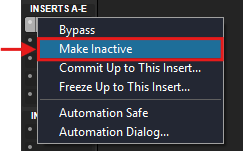
- Right-click the plugin again, and select Make Active