CONTENTS
If you receive the error message "This serial has been registered to a different account" while trying to activate your Air plugin in the inMusic Software Manager, don't worry! This guide will help you resolve the issue.
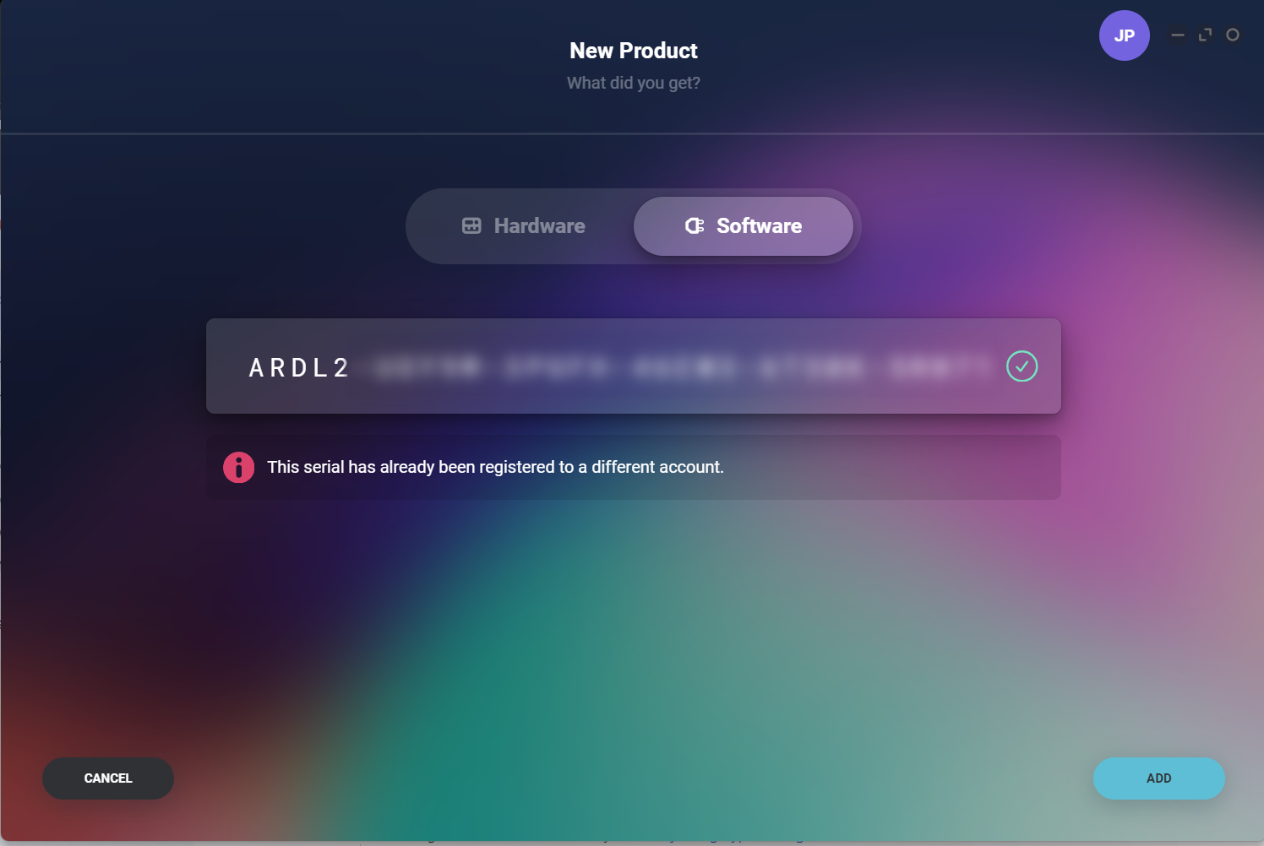
Why You Might See This Error:
- Purchase Email Discrepancy: If you purchased the software from the Air Music website, the license is automatically tied to the email used for the purchase. You may see this error if you try registering it under a different email.
- Typo in Serial Number: Double-check the serial number you entered to ensure there are no typos. A small mistake can trigger the error.
- Previous Account Registration: The serial might have been registered to a different account, either by mistake or due to a previous registration.
Steps to Resolve the Error:
- Verify Serial Number Accuracy: Carefully re-enter the serial number to rule out any typos.
- Check Your Accounts: If you have multiple email accounts, ensure you're logging in with the one used to purchase the plugin.
- Transfer License: If you're certain the serial is correct and linked to a different account, simply log into the account which hosts the license, click on your product and use the License Transfer tool at the bottom of the page to transfer ownership of the license to your preferred account.
- Contact Support: If you do not have access to the account which currently owns the license, please contact our support team with proof of purchase/ownership for further assistance.